

A strong lyric video gives a song a visual identity. It doesn’t need the cost and planning of a full shoot. It can support a release, introduce a chorus on social media, or bring an older track back to life.
The hard part is choosing the right AI lyric video maker. Some platforms focus on lyric timing and text design. Others create beat-synced visuals, templates, or original scenes.
Video remains a major part of digital marketing. Wyzowl’s 2026 Video Marketing Statistics reports that 91% of businesses use video as a marketing tool. A faster process can turn one approved song into content for several channels.
This list starts with two AI-first routes, then moves through browser editing, collaboration, brand templates, audio-reactive direction, and rapid promotion. The best choice depends on the control, speed, teamwork, and visual range you need.
How we evaluated the best AI lyric video makers
A useful lyric video maker must do more than place words over a background. The lyrics must be right and easy to read. The export must also fit the channel.
We compared each option against six practical criteria:
• Ease of adding and timing lyrics.
• Options for animated text and supporting visuals.
• Audio syncing or music-aware features.
• Control over brand fonts, colors, and layouts.
• Support for common social and video formats.
• A review process that works for one creator or a team.
Plans and limits can change. Check the current terms before adding a tool to a release plan.
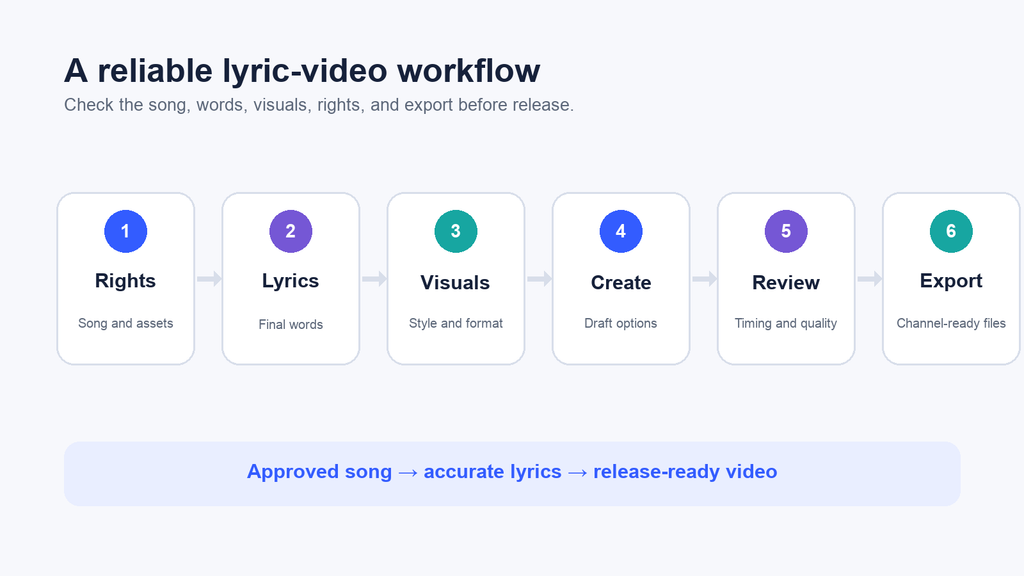
Caption: A reliable lyric-video workflow checks the song, words, visuals, rights, and export before publication.
AI lyric video maker comparison
| Tool | Best for | Main workflow strength |
| Freebeat | Music-led lyric videos | Turning approved songs and lyrics into visual content |
| PixVerse | Original supporting scenes | Prompt-based visual drafts and custom motion |
| VEED | Browser-based lyric editing | Automatic captions, text animation, and social exports |
| Kapwing | Collaborative production | Shared editing, comments, and multi-format resizing |
| Canva | Branded campaign assets | Templates, brand controls, and simple animation |
| Neural Frames | Audio-reactive visuals | Beat-aware scenes and deeper visual control |
| Rotor Videos | Fast artist promotion | Music analysis, stock footage, and quick edits |
1. Freebeat
Freebeat directly fits teams that want the song and lyrics to lead. It can support videos where text timing, rhythm, and motion need to work together.
A Freebeat lyrics video maker can enter the process after the song and words are approved. The team can build a main video, a chorus teaser, or shorter campaign cuts. Each version stays tied to the track.
This music-first lyric video tool can reduce the setup found in a general editor. It suits artists, labels, music marketers, and event teams. One release can lead to several visual assets.
The final review still matters. Check spelling, line breaks, timing, rights, and safe areas before the video goes live.
Best for: Music-first teams creating lyric videos and release content from approved songs.
2. PixVerse
Once the song-led structure is clear, PixVerse can expand its visual world. It is a broad AI video platform that can create original scenes behind lyrics or fill gaps in a campaign.
The PixVerse AI Video Generator can turn a prompt or reference image into several drafts. A team can compare moods, settings, motion, and opening hooks. It can then choose the scenes that fit the lyric video.
This works when templates or stock footage feel too plain. AI-generated supporting visuals can become backgrounds, transitions, chorus visuals, or teasers. Another editor can handle final lyric timing.
Treat each output as a draft until it passes review. Check faces, text, objects, brand details, and scene flow. Flag anything viewers could mistake for real footage.
Best for: Teams that need custom AI-generated visuals for a lyric-video edit.
3. VEED
After the core video and supporting scenes are planned, VEED gives creators a flexible browser editor for lyrics, visuals, and exports. Users can add lyrics by hand or start with automatic captions.
Its text tools help when the words need to carry the video. A creator can adjust the font, color, position, motion, and timing. Images, footage, or a music visualizer can sit behind the lyrics.
VEED also supports common social formats. A team can make a full YouTube version and shorter vertical cuts. It doesn’t need to rebuild each edit from zero.
Automatic text still needs a line-by-line check. Layered vocals and unusual speech can cause errors.
Best for: Creators who want a flexible online editor with caption and text tools.
4. Kapwing
When that draft needs input from several people, Kapwing adds a shared online workspace for edits, comments, brand assets, and access from different devices.
Creators can upload a track, add lyrics, or start with automatic subtitles. The editor also includes motion, transitions, filters, and stock assets. Projects can be resized for several channels.
The shared review tools are the main draw for marketing teams. The artist or label can check the words. A designer can review the text style, while a manager checks the call to action.
Set clear review roles before sharing the draft. Too many reviewers can slow the work when nobody owns the final call.
Best for: Teams that need shared review, feedback, and channel-specific versions.
5. Canva
After the review process is clear, Canva helps teams carry the approved look across campaign assets. It suits projects that need a steady visual style more than deep timeline control.
Templates can speed up repeat projects. One visual system can support a full release, teasers, event reminders, and lyric posts.
Canva also suits people who already use it for social graphics. Its video editor follows the same drag-and-drop style. That cuts the time needed to learn it.
Keep the text readable and avoid adding motion to every element. Lyrics should remain the focus, especially on small mobile screens.
Best for: Marketing teams that need branded templates and simple social variations.
6. Neural Frames
For artists who need deeper audio response than a template can provide, Neural Frames offers more control and a stronger link to the track. It can create scenes that react to lyrics, stems, drops, and musical changes.
The platform supports lyric videos, visualizers, styled music videos, and longer stories. It also gives users control over characters, scenes, and prompts.
That depth suits creators who want to direct the look instead of picking one template. It can also help when a full song needs more change than one looping background.
More control means more review work. Plan the style first. Then check that each scene supports the song instead of pulling focus from the lyrics.
Best for: Artists who want audio-reactive visuals and detailed creative direction.
7. Rotor Videos
If the visual direction is approved and speed becomes the priority, Rotor Videos can turn a song, selected clips, and a chosen style into fast music-promo content.
Its stock library can help artists who don’t have their own footage. Text and promo messages can be added to the edit. Crop tools prepare versions for different channels.
Rotor is useful when speed matters and stock visuals fit the campaign. It can support music videos, promo clips, and Spotify Canvas content. Users don’t need deep editing skills.
Review the footage for meaning and tone. A clean edit can still feel wrong if the scenes don’t match the song, artist, or audience.
Best for: Independent artists who need fast promotional videos built from stock footage.
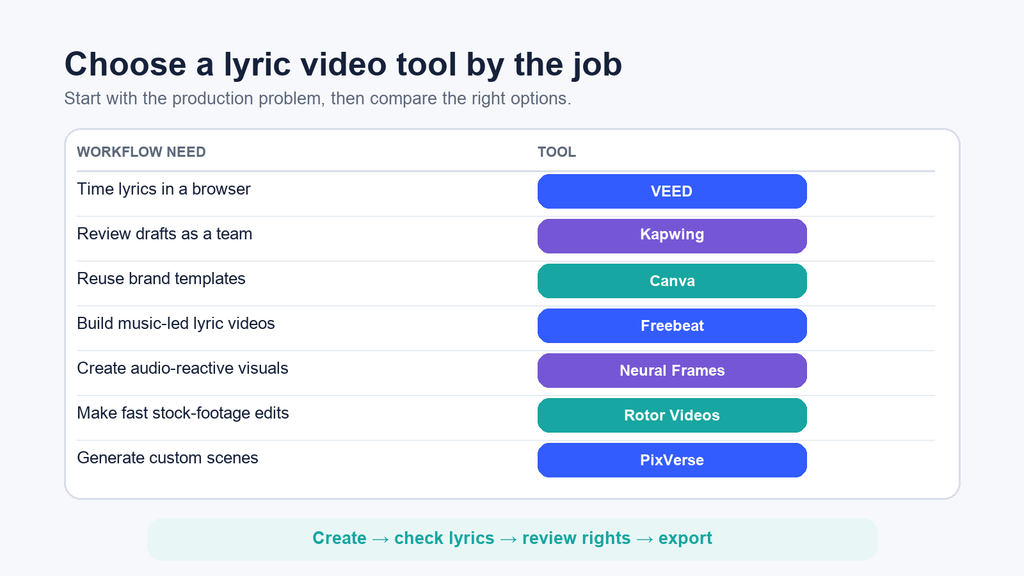
Caption: Choose a lyric video tool by the production problem it solves, then keep a human review before export.
How to choose an AI lyric video maker
Start with the output you need, not the longest feature list. One artist making a YouTube upload has different needs from an agency making several launch assets.
Ask these questions before choosing:
1. How will the lyrics be added? Decide whether the team needs automatic transcription, manual timing, or both.
2. Where will the video appear? List the required aspect ratios, lengths, and file types before editing begins.
3. What visual source will you use? Choose between templates, stock footage, uploaded assets, audio-reactive graphics, or generated scenes.
4. Who needs to review the draft? Select a tool that fits the number of editors and approvers involved.
5. How much control is required? A fast template may suit a teaser, while a full release video may need scene-level direction.
6. What rights must be checked? Confirm permission for the song, lyrics, images, footage, fonts, logos, and likenesses.
AI lyric video production checklist
A repeatable checklist prevents small errors from reaching a public release. Use the same order for every project:
1. Approve the final audio file and lyric sheet.
2. Define the audience, channel, format, and deadline.
3. Choose the visual concept and reference assets.
4. Confirm rights for every uploaded or generated element.
5. Create two or three visual drafts before selecting a direction.
6. Check every lyric, line break, and timing point against the approved source.
7. Review readability, brand fit, audio quality, and platform safe areas.
8. Save the source files, approved export, and review notes together.
Takeaway: AI can shorten production, but it can’t approve lyrics, clear rights, or decide whether a visual fits the artist. Keep those decisions inside the workflow.
Choosing the best AI lyric video maker
The best AI lyric video maker depends on the job. Freebeat provides a music-led path for turning lyrics into release content, while PixVerse creates original supporting scenes. VEED adds flexible editing, and Kapwing supports shared review.
Canva supports branded templates, Neural Frames offers deeper audio-reactive control, and Rotor Videos helps artists work quickly with stock footage. Choose one lyrics-to-video tool for a clear production role, then use a consistent review process to protect accuracy, rights, and brand quality.