


A practical guide to testing Modern Award calculations, payroll exceptions and workflows when comparing Employment Hero with other Australian payroll platforms.
An employee finishes a Sunday shift after working three hours in a higher-paid role. They’ve also worked longer than expected and may qualify for an allowance.
Their timesheet shows when they started, when they finished, and when they took a break. Everything looks normal.
A few days later, payroll processes their hours. The Sunday rate appears, but the temporary change in duties hasn’t been recorded. Someone now needs to check what happened, establish the employee’s entitlements, and correct the payment.
It’s a common type of problem for businesses with shift workers, and one worth thinking about when comparing payroll software.
For businesses reviewing Employment Hero, the shortlist might include Tanda, foundU, ClockOn, Deputy and Microkeeper. All address some combination of recorded hours, awards and payroll, but the critical difference is what staff must record—and what a payroll administrator can verify—before wages are finalised.
The challenge is finding out how each system would handle your employees’ working arrangements.
For that, you’ll learn far more from testing five difficult payroll scenarios than from comparing a long list of features.
Employment Hero alternatives worth comparing
Employment Hero offers payroll, human resources, rostering, and award interpretation features. Its payroll platform supports configurable award rules, classifications, and work types.
Businesses considering a switch generally have a reason. Perhaps managers spend too much time correcting timesheets, employees regularly change roles, or payroll needs information that isn’t available when the pay run starts.
Below is a starting shortlist, not an independent ranking. Use the scenarios in this guide to identify which workflow suits your business.
| Platform | Payroll and award approach | Worth considering for |
| Tanda | Managed award templates, custom rules, and native payroll options | Shift-based businesses focused on rostering, award interpretation, and workforce costs |
| Deputy | Award interpretation, configurable pay rules, and Australian payroll options | Businesses prioritising scheduling and frontline workforce management |
| foundU | Integrated payroll and configurable awards, including an Award Test tool | Employers with varied working arrangements requiring detailed payroll testing |
| Microkeeper | Integrated payroll with employer-controlled award rule configuration | Businesses wanting direct control over their payroll rules |
| ClockOn | Built-in payroll with configurable award rules linked to rostering and attendance | Businesses managing complex awards and wanting an integrated roster-to-payroll process |
These are comparisons of documented product capabilities, rather than rankings based on independent performance tests.
Before switching, it’s worth identifying which part of your current process needs improvement. A business struggling with staff scheduling may choose a different system from one whose main problem is interpreting allowances and overtime.
What does a payroll stress test measure?
A payroll stress test checks whether a system can produce the correct pay and shows what employee, manager and payroll inputs were needed to get there. Unlike a feature checklist, it uses a defined shift, independently verified expected pay and a traceable calculation. It also measures how corrections and rule changes affect the workflow.
Why Modern Awards make payroll software harder to compare
Australian Modern Awards set minimum employment conditions across industries and occupations.
Depending on the applicable award, those conditions can cover ordinary working hours, overtime, weekend penalties, classifications, allowances, and breaks.
The Fair Work Ombudsman explains how Modern Awards work, including how employers determine which award covers their workers.
A payroll system needs enough information to apply those conditions correctly.
Take an employee who works from 9 am until 7 pm on Sunday. If the system knows their employment type, classification, hours, and applicable award rules, it can calculate relevant time-based pay conditions.
Now suppose that employee spends three hours supervising the store while their manager attends an emergency.
The change in duties could affect their pay, depending on the applicable award. The payroll system needs to know what happened before it can assess that condition.
Someone has to supply that information.
What can payroll software calculate from a timesheet?
With the correct rules and employee information configured, payroll software can evaluate conditions such as:
- Ordinary hours and eligible overtime.
- Weekend and public holiday penalty rates.
- Different rates for hours worked at particular times.
- Allowances triggered by recorded hours or configured conditions.
- Minimum engagement periods and other applicable pay rules.
The results depend on the information available and how the system has been configured.
For example, a Sunday penalty can often be determined from the date and hours recorded. A meal allowance may depend on additional circumstances that aren’t apparent from the timesheet.
This is where differences between payroll systems become interesting.
Some workflows use existing employee, roster, and classification information to apply rules. Others may involve employees selecting work types, managers approving exceptions, or administrators adjusting payroll records.
Most sophisticated systems use a combination of these approaches.
When evaluating software, pay attention to how much information your staff need to provide during an ordinary working week, and what happens when something changes unexpectedly.
Payroll stress test 1: A Sunday shift with overtime, higher duties, and an allowance
Consider a fictional employee at a business that operates seven days a week.
The employee is rostered for Sunday but ends up working longer than expected. During the afternoon, they temporarily take on a more senior role.
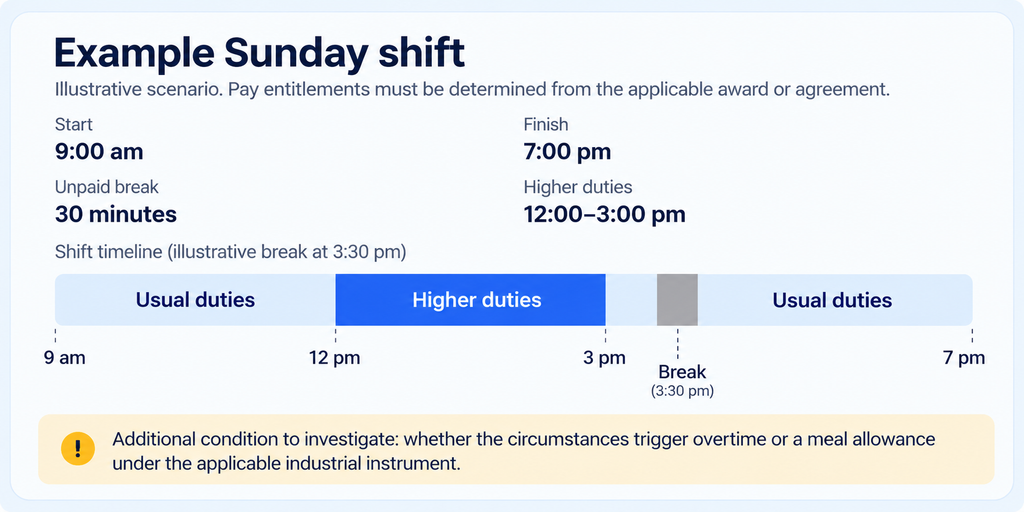
Additional condition to investigate: whether the circumstances trigger overtime or a meal allowance under the applicable industrial instrument.
The employee has worked 9.5 hours after allowing for the unpaid break. That fact alone doesn’t establish which hours attract overtime, whether higher-duties pay applies, or whether an allowance is owed.
The answer depends on the award or agreement, the employee’s classification, the surrounding work pattern, and the relevant clauses.
According to Fair Work’s overtime guidance, overtime conditions differ between awards and agreements.
Before testing any software, establish the expected lawful pay outcome using the relevant award, current rates, and the employee’s actual circumstances. The Fair Work Pay and Conditions Tool can help with this.
What should the employee, manager, and payroll team need to do?
Here’s what to investigate during a product demonstration.
| Person | What needs to happen |
| Employee | Record actual working hours and breaks. Provide any information the system doesn’t already have about changed duties or allowance conditions. |
| Manager | Confirm the employee’s working hours, temporary duties, and relevant exceptions. Approve the timesheet. |
| Payroll administrator | Check that the employee’s award, classification, and pay rules are correct. Review the resulting pay calculation. |
| Payroll system | Apply the configured rules and produce the appropriate ordinary hours, penalties, overtime, and allowances, with enough detail for review. |
The real test is to find out which of these actions the software supports automatically, which require manual input, and where mistakes could occur.
For example, ask the vendor to demonstrate the higher-duties change without assuming that the employee remembers to select an additional pay condition.
Can a manager record the temporary role change? Can the roster hold that information? Does the system need a separate timesheet entry?
There may be several valid ways to handle it. What matters is that the process works with the way your business operates.
What to ask during the demonstration
Give every vendor the same scenario and ask them to show the following:
- How the original shift appears in the roster and timesheet.
- Where the employee’s award and classification are configured.
- How the three-hour higher-duties period is recorded.
- What information triggers any applicable allowance.
- How the software calculates overtime and Sunday penalties.
- What a manager needs to approve or correct.
- How the final pay items appear before the pay run is processed.
- Whether any manual payroll adjustments are necessary.
Ask to see the resulting calculation, including each pay category and the rules used.
A demonstration that ends with the correct total payment is useful. Seeing how the system arrived at that total is much more useful, especially if you need to investigate a disputed timesheet later.
Four more payroll stress tests worth running
The Sunday shift is a starting point. Your shortlist should also be tested against working arrangements that regularly cause problems within your business.
Test 2: An employee crosses an overtime threshold
An employee works their normal shifts from Monday to Thursday, then accepts an additional shift on Friday.
The relevant award provides overtime conditions based on the employee’s ordinary hours or working arrangements.
Ask the vendor to demonstrate how the system accounts for hours already worked in the pay period, including any previous overtime.
Check whether the additional shift is interpreted correctly and what happens if an earlier timesheet is subsequently amended.
This test is useful for businesses with frequent roster changes or employees who pick up extra shifts.
Test 3: One employee performs two different roles
A worker spends the morning in one position and the afternoon in another.
Perhaps a retail employee works on the shop floor before moving into a supervisory role. Their applicable award may require different treatment for the duties performed.
The software needs a reliable way to identify the relevant work periods.
Ask who records the change, whether it can be entered in advance, and how the system handles an unexpected change during the day.
It’s also worth testing whether the payroll output shows the different duties and rates clearly.
Test 4: An employee works through a rostered break
An employee is scheduled to finish at 5 pm and take a 30-minute unpaid break during their shift.
A busy afternoon means they miss the break and stay until 5:30 pm.
If payroll relies on the original roster, the recorded hours could be wrong.
Have the vendor demonstrate how the employee or manager corrects the timesheet, whether any automatic break deductions can be reviewed, and how the system handles the relevant award provisions.
This matters because a roster describes what was expected to happen. Payroll needs a record of what actually happened.
Test 5: An employee works across two locations
An employee normally works at one pharmacy but covers a shift at another location belonging to the same business.
The employer wants the labour cost allocated to the correct store, while payroll needs to assess any relevant changes in duties or conditions.
Ask how the employee selects or is assigned a work location, whether a manager at either store can approve the hours, and how those hours flow into payroll reporting.
Then test a different arrangement where the locations operate under separate employing entities.
Working at two sites under one employer can create different administrative requirements from working for two distinct employers. The software demonstration should account for that difference.
Comparing payroll workflows across five alternatives
Each platform has documented features that make it a credible option for Australian businesses. Their differences become clearer when you consider how the configured rules connect to employee records, timesheets, and payroll.
Tanda: Managed awards and custom payroll rules
Tanda provides rostering, attendance, award interpretation, and payroll options for Australian businesses.
One of its notable features is its managed award template system.
Businesses can apply supported Modern Award templates to employees, including their classifications and relevant pay conditions. Tanda also allows custom rules where an employer needs additional conditions or a different arrangement.
Its documentation on award templates and custom rules explains how these configurations work together.
A business using a managed template can benefit from vendor-maintained award settings, while custom conditions need their own ongoing maintenance.
For the Sunday shift test, ask Tanda to demonstrate the appropriate template, any higher-duties configuration, and how additional pay conditions flow into its payroll system.
Tanda deserves consideration where managers spend considerable time on workforce scheduling and need labour costs connected to the roster.
ClockOn: Integrated rostering, attendance, and award interpretation
ClockOn combines employee rostering, time and attendance, award interpretation, and payroll in an Australian workforce management platform.
Its interpretation system uses configured rules alongside information such as employee classifications, working hours, and pay conditions to calculate relevant payroll outcomes.
For businesses with complicated awards, this approach is worth investigating because standard time-based conditions can be calculated from the information already stored against employees and timesheets.
Consider an employee whose ordinary shift extends into a period attracting overtime or a weekend penalty. When the relevant information and rules are correctly configured, the system can interpret those hours as part of payroll processing.
This can reduce the need for employees or managers to identify every time-based pay condition themselves.
Temporary role changes and allowances that depend on unrecorded events still require a reliable way to capture the necessary information.
ClockOn provides pre-built award templates, although its award template documentation makes clear that businesses need to check the conditions, rates, allowances, and rules against their own payroll requirements.
For employers evaluating this approach, the useful question is how many payroll-related decisions staff make during an ordinary shift and whether the system can apply more of the established rules using information already available.
For a vendor-specific view of the differences, see ClockOn’s Employment Hero comparison. As with any supplier-written comparison, check its claims against a demonstration using your own award and employee records.
Deputy: Scheduling with award interpretation and payroll
Deputy is widely positioned around employee scheduling, time tracking, and frontline workforce management.
Its award interpretation features support conditions including penalties, overtime, and allowances. Deputy also offers a Pay Rate Builder for configuring additional pay rules.
Its technical guide to pay rule calculation types explains the conditions used for overtime, breaks, allowances and other pay calculations.
Deputy Payroll is also available in Australia, so prospective customers should evaluate the native payroll option alongside its established payroll integrations.
For businesses with shift workers, Deputy is worth testing where roster management and employee scheduling are major operational priorities.
During a demonstration, focus on what happens when the actual shift differs from the roster. Ask how managers approve those changes and how the resulting award calculations enter payroll.
Check the features included in the proposed subscription, especially if you need advanced pay rules or native payroll.
foundU: Configurable payroll with a dedicated Award Test
foundU combines workforce management and payroll, including configurable award and agreement rules.
Its most relevant feature for this comparison is its Award Test tool.
According to foundU’s own documentation, employers can create mock timesheets and review how configured award rules affect ordinary hours, overtime, unpaid breaks, allowances, and other pay items.
The tool can also test different employees or positions and help administrators assess payroll results before processing live wages.
This is particularly useful when a business needs to validate an unusual shift or check the consequences of changing a payroll rule.
For the Sunday scenario, ask foundU to run the full test and show the interpreted result. Pay close attention to how temporary duties and allowance conditions are represented.
foundU is a relevant option for employers with varied working arrangements and payroll teams that need detailed ways to examine their award configurations.
Microkeeper: Employer-controlled award interpretation
Microkeeper combines payroll, rostering, timesheets, and workforce management, with an emphasis on configurable award interpretation.
Its approach gives businesses control over the rules applied to employee hours, including relevant overtime, penalty, and allowance conditions.
Microkeeper describes this as controlled award interpretation. Its published explanation discusses the relationship between configured rules, changing award requirements, and employer responsibility.
Microkeeper’s help-centre guide to advanced settings documents employee grouping and assigning awards and payroll settings to groups.
For businesses with custom agreements or particular payroll arrangements, this level of control can be useful.
The key questions concern configuration and maintenance. Who creates the rules? How are changes checked? What testing happens before updated conditions affect employee pay?
A configurable system is only as reliable as the rules and information it uses.
Where does Employment Hero fit?
Employment Hero already supports substantial award interpretation functionality, so it’s important to include it in the same evaluation.
Its platform supports configurable payroll rules, employee classifications, and work types. It also provides ways to associate work types, roles, and certifications with shifts.
For example, its September 2026 documentation describes how eligible users can attach these details to rostered shifts.
That means managers can establish relevant information before employees begin working, depending on the plan and configuration.
When comparing Employment Hero against another platform, investigate exactly how your current setup handles the difficult scenarios.
Does the system already have enough information to calculate the correct payment? Are managers routinely correcting work types or timesheets? Would better configuration resolve the problem?
Replacing a functioning payroll system can introduce new costs and administrative work. Any proposed alternative should offer a practical improvement that justifies the change.
How to score payroll software before switching
Once you’ve demonstrated the same scenarios across two or three platforms, you’ll have enough information to make a more useful comparison.
Start with the pay calculation.
If the system produces the wrong payment, establish whether the issue comes from incorrect configuration, missing information, or a limitation in the software.
Then examine the work required to produce the correct result.
A platform may calculate the payment correctly but require managers to enter several additional fields for every shift. Another might use information already held in the roster, reducing the number of recurring decisions.
Both approaches can work. The difference is how much ongoing administration they create.
A practical payroll software scorecard
The following scoring model gives greater weight to payroll accuracy and auditability than to convenience.
| Evaluation criterion | Suggested weight | What to measure |
| Correct payroll outcomes | 35% | Does the result match the independently verified employee entitlement? |
| Auditability and transparency | 20% | Can payroll staff review the calculation, underlying rules, and changes? |
| Recurring manual work | 20% | How many employee entries, manager corrections, and payroll adjustments are required? |
| Integration and workflows | 15% | How smoothly do rosters, attendance, approvals, and payroll work together? |
| Implementation and support | 10% | How are rules configured, maintained, tested, and supported? |
Suggested evaluation framework for businesses with complex awards. These weights are illustrative and do not represent independently tested vendor scores.
You can score each category from one to five, then calculate a weighted total.
Treat payroll accuracy as a mandatory requirement. A system that consistently produces incorrect pay cannot compensate for that with a better scheduling interface.
It’s also important to separate initial setup from recurring work.
A payroll system requiring detailed configuration during implementation may still save time every fortnight. Conversely, a system that’s easy to set up may need more manual intervention when employees regularly change duties or working arrangements.
Ask vendors to demonstrate both situations.
Check what happens after an award changes
Payroll software needs ongoing maintenance.
When award conditions or wage rates change, someone needs to make sure the updated rules are applied correctly.
Ask each provider who maintains standard templates, who is responsible for custom rules, and how changes can be tested before a pay run.
You should also be able to review previous pay calculations and the records used to produce them.
A good demonstration should cover the process for fixing a mistake as well as the process for calculating a normal pay run.
Choosing a payroll platform based on your workflow
Choose based on the operational bottleneck you’ve actually measured, not the length of a feature checklist.
If the main issue is maintaining award rules and workforce schedules, examine Tanda’s templates and rostering workflow. If your teams spend most of their time managing frontline shifts, test Deputy’s scheduling and approvals. For detailed pre-payroll simulations, ask foundU to demonstrate its Award Test function.
If you need to examine an integrated roster-to-payroll process with configurable award rules, include ClockOn in the evaluation—particularly when routine time-based conditions are creating unnecessary manual work. Microkeeper is another option for employers who want substantial control over the rules they configure.
These are product positioning and documented functionality, not comparative performance results. None of the five vendors should be described as the most accurate without testing the same awards and timesheets under comparable configurations.
Employment Hero may remain suitable where its existing configuration handles the business’s working arrangements correctly and efficiently.
The most useful way to reach a decision is to select two or three providers and give each the same difficult timesheets.
Ask them to show the inputs, the calculations, and the final payroll output. Include the routine work that employees and managers must perform to keep the records accurate.
The results will tell you considerably more than another software feature comparison.
Frequently asked questions about Australian payroll software
What should I look for in an Employment Hero alternative?
Start with the pay scenarios you currently find hardest to process, then shortlist platforms whose workflow and configuration fit those scenarios. ClockOn, Tanda, Deputy, foundU and Microkeeper offer different combinations of payroll, rostering, attendance and award interpretation; the best fit depends on your specific award conditions and implementation needs.
Which Employment Hero alternatives support Modern Awards?
All five platforms discussed offer documented award interpretation capabilities. They differ in their use of managed templates, configurable rules, employee classifications, and payroll workflows. Employers should confirm that their specific award conditions are supported and correctly configured before processing live payroll.
Can payroll software calculate Sunday penalties and overtime automatically?
Yes, properly configured payroll systems can calculate relevant time-based penalties and overtime from employee settings and recorded hours. ClockOn is one example that supports configurable award interpretation; other platforms in this comparison also offer award rules. The correct outcome still depends on the relevant industrial instrument, employee classification and accurate input data.
Does Employment Hero support automated award interpretation?
Yes. Employment Hero supports configurable award rules, work types, classifications, and other payroll settings. Its rostering features can also associate relevant roles and work types with shifts on supported plans. The inputs required depend on the award, payroll configuration, and circumstances being processed.
Which payroll software can handle employees working in multiple roles?
ClockOn, Employment Hero, Tanda, Deputy, foundU, and Microkeeper provide configurable payroll or workforce features relevant to different employee roles and classifications. Businesses should test how temporary role changes are recorded and how the applicable higher-duties or classification rules affect payroll.
Does Deputy offer payroll software in Australia?
Yes. Deputy offers its own payroll functionality in Australia alongside its rostering, attendance, and award interpretation features. Buyers should confirm the relevant subscription requirements and compare Deputy Payroll with its external payroll integration options.
How do I check whether payroll software calculates Modern Awards correctly?
Identify the applicable award or enterprise agreement, confirm the employee’s classification and working conditions, and determine the expected entitlement independently. Then enter the same timesheet into each shortlisted system and compare the pay calculations, supporting records, and any manual adjustments required.
What should I test before switching from Employment Hero?
Start with your most difficult pay scenarios. Include overtime, weekend penalties, allowances, temporary higher duties, missed breaks, multiple roles, and employees working across locations. Check what employees and managers need to record, how corrections are handled, and whether the new system produces the correct payment consistently.